![YorkIE_Fuel-light-mint.svg]](https://knowledge.york.ie/hubfs/YorkIE_Fuel-light-mint.svg)
Follow these instructions for installing the progressive web app (PWA) on an iOS or Android mobile device:
iOS
-
Open Sarari and navigate to Fuel https://fuel.york.ie
-
Note: If errors occur, check to make sure Safari isn’t set to “Block all Cookies” in the phone settings.
-
-
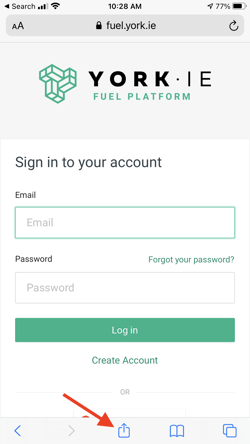
Click the share button at the bottom of the window
-
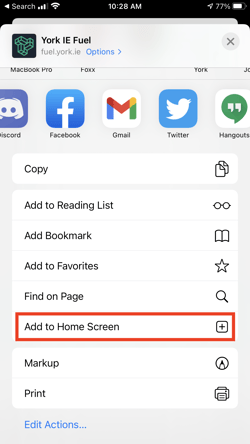
Scroll down and select “Add to Home Screen”
-
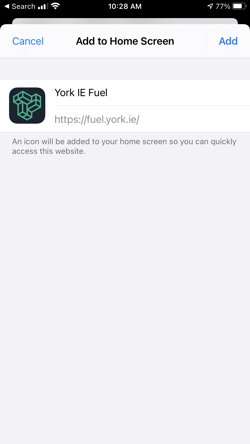
Click “Add”
-
Done!
Note: If your device at any time does not have internet connectivity, the app may display as a blank white screen. If this occurs, verify that you are not connected to the internet. If you are and this occurs, contact support.
Android
-
Open Chrome on your Android device and navigate to https://fuel.york.ie
-
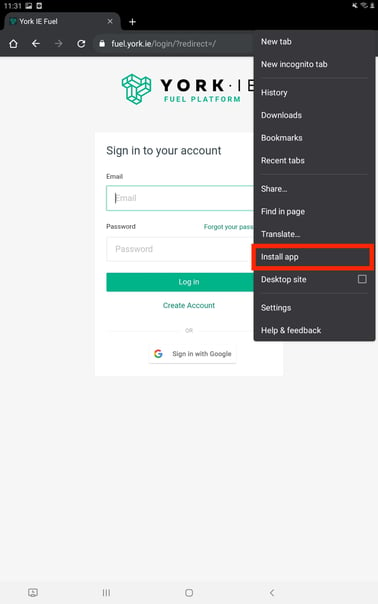
Select the vertical ellipsis menu at the top right of the browser
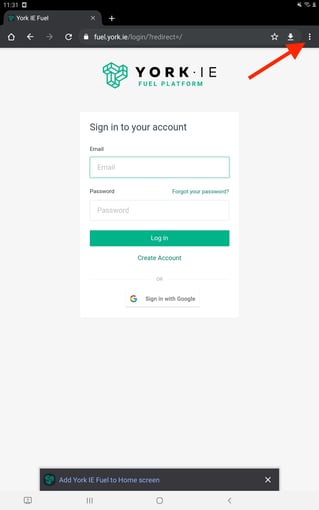
You may be prompted on the screen to add York IE Fuel to the home screen - clicking this popup will install it as well
-
Scroll down and select Install App
-
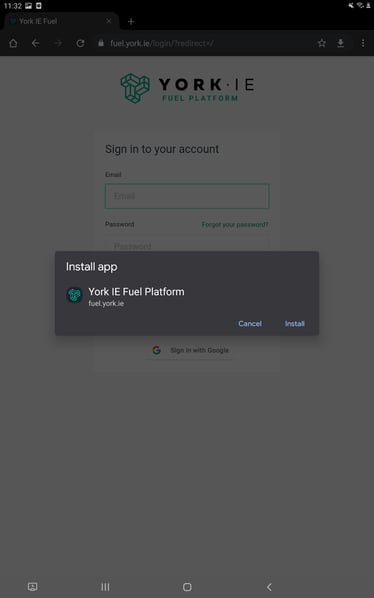
Click Install from the popup window
-
Done!